Guard Posts - Fan-Made Mod for Minecraft

Guard Posts - Protect what you build!
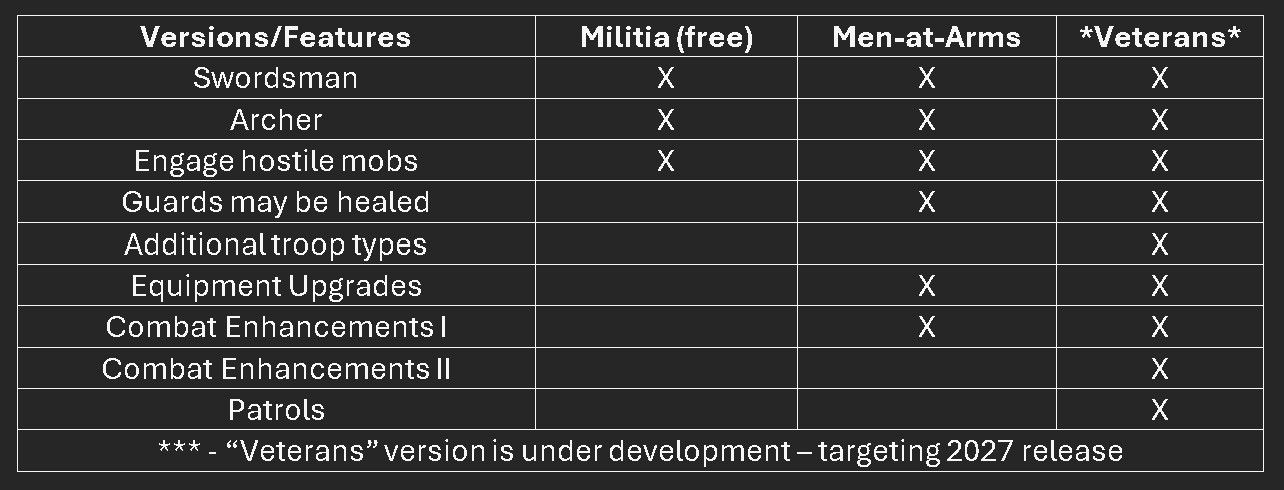
You spend all that time building - at last you can put the finishing touches on that castle! Place archers on the walls, guards at the gates - watch them engage hostiles and return to their posts. Guard Posts is available in two editions, with a third in development. The free version - Militia - includes all core functionality. For installation directions and notes, scroll down on this page. NOTE: This mod is for Minecraft Bedrock Edition on PC/laptop/Android/iOS devices.
Unlike village-based or colony-based guard mods, this pack lets you place defenders exactly where your build needs them - walls, gates, towers, courtyards - without requiring a village, colony, or complex setup. One might even bring a few in the inventory to be placed as rear-guards while mining!
Downloads have no ads, pop-ups, or any other nonsense - just the add-on.
Click here to download the free version.
Click here to purchase the full version (takes you to Gumroad).
Click here to view videos on how to use the pack and what it does (takes you to YouTube).
Directions to download and install Guard Posts
1. Download the .mcaddon file, or purchase the full version.
2. Open the file from the download location. Minecraft should open and import the mod automatically.
(If this is the first time you've opened an add-on, you may be prompted to select with what program to open the file. Choose Minecraft.)
To use the mod:
1. Create a new world.2. Name the world and select mode and difficulty (works in both survival and creative).
3. Select "Behavior Packs" and activate either the Militia or Men-at-Arms pack. (Make sure only one of the two is active.)
4. Select "Resource Packs" and verify that the related pack is active (it should be automatically).
5. Click "Create" and accept the warning about achievements being disabled (if it appears). Questions? Find support on Discord here -
 Guard Posts Support Thread.
Distinguishing the versions of Guard Posts available
The following table explains the differences between the free version and other versions of Guard Posts.